
API Keys
Learn how to create API keys for Yoodli's REST API.
API keys are required to authenticate requests to the Yoodli REST API.
Each API key must be included as a bearer token in the Authorization header of your API requests.
Authorization: Bearer YOUR_API_KEY_HEREOrganization Management API Keys
Use these API keys to manage users and user groups within your organization programmatically.
Requirements
- You must be an Organization Administrator or Organization Owner
- Maximum of 3 API keys per Organization
Creating an API Key
- Sign in to Yoodli and switch to "Admin" view
- Navigate to "Org settings" page
- Find the "Access and SSO" section and locate "Organization Management API"
- Click "Manage" button
- Click "Create API key" button
- Fill in the details:
- Enter a descriptive Key Name
- Set expiration date (or select "Never expires")
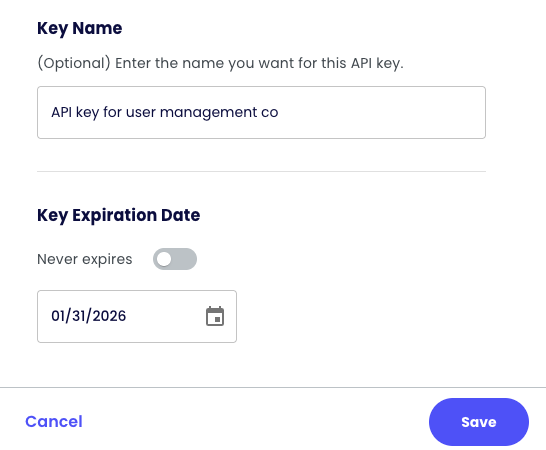
- Click "Save"
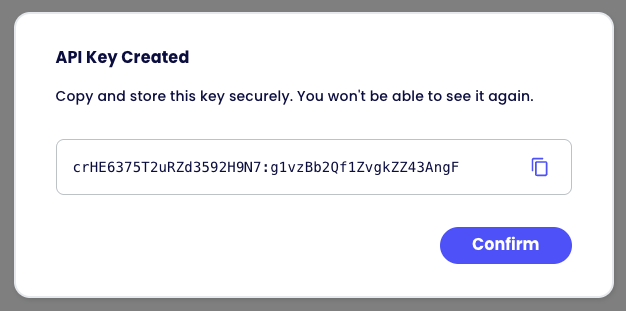
- You will see the created API key
Multi Org Management API Keys
Use these API keys to manage Organizations within your Multi Org programmatically.
Requirements
- You must be a Multi Org Administrator
- Maximum of 3 API keys per Multi Org
Creating an API Key
- Sign in to Yoodli and switch to "Admin" view
- Navigate to "Org settings" page
- Click "Manage Multi Org" button at the top right corner
- Move to "Settings" tab
- Find the "Access" section and locate "Multi Org Management API"
- Click "Manage" button
- Click "Create API key" button
- Fill in the details:
- Enter a descriptive Key Name
- Set expiration date (or select "Never expires")
- Click "Save"
- You will see the created API key
Securing Your API Key
After a key is created, the page will display your new API key. Save it immediately in a secure location such as:
- Password manager
- Secret management service
- Encrypted configuration file
⚠️ Yoodli cannot display your API key again after initial creation. If you lose the key, you'll need to create a new one.
Updated 10 months ago
Did this page help you?