
Quickstart
Make your first API call in just a few simple steps using our interactive API reference.
This guide walks you through making your first API call.
Prerequisites
You must be an Organization Administrator or Organization Owner to try this.
Getting Started
Step 1: Create an API Key
Create an Organization User Management API Key by following this instruction.
Step 2: Find Your Organization ID
- Navigate to your organization settings page
- Scroll to the bottom to locate your Org ID
Step 3: Call the API
-
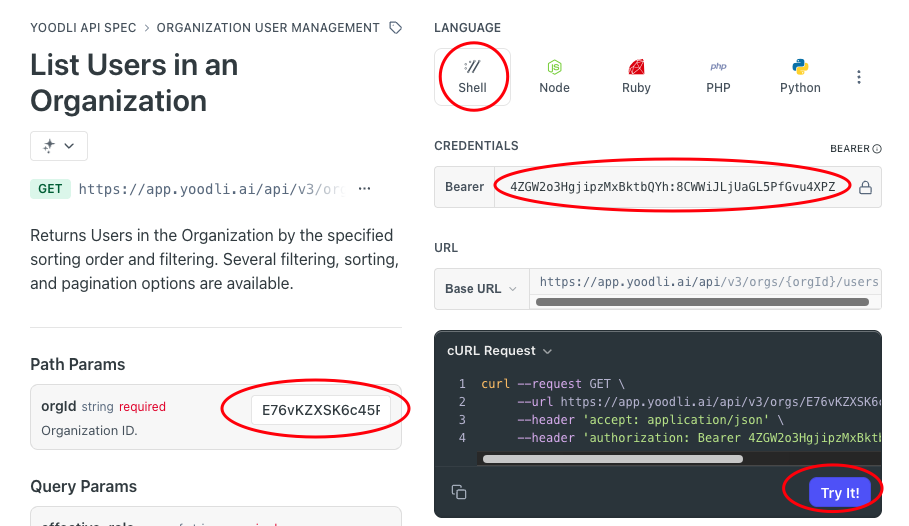
Visit the List Users in an Organization API reference page
-
In the Credentials section, enter your API key from Step 1
-
In the Path Params section, enter your Org ID from Step 2
-
Click "Try It!"
You should see a response listing all members in your organization in this page.
Optionally, you may inspect the traffic in the Network section of the browser's Developer Tools.
Optional: Test with cURL Command-Line Tool
You can also test the API outside of the browser using cURL, a command-line tool that comes pre-installed on macOS and Windows.
-
On the API reference page, select Shell as the language in the code examples section
-
Choose cURL Request from the dropdown menu below the endpoint URL
-
Copy the generated cURL command and paste it into your Terminal (macOS/Linux) or Command Prompt (Windows)
-
Press Enter to execute the command and see the API response
Updated 10 months ago